
SoftHands Payroll – One Computer License

Professional offline payroll and workforce management software designed for home care agencies.
SoftHands Payroll helps your agency manage:
• Caregivers, employees, contractors, and clients
• Work schedules and recurring shifts
• Payroll periods and pay dates
• Employee tax withholding and contractor payments
• Estimated company revenue, labor costs, administrative expenses, and net profit
• Active, completed, missed, scheduled, and archived shifts
• Payroll reports, forms, calendars, and agency documents
• Data imports from supported caregiver applications and client intake forms
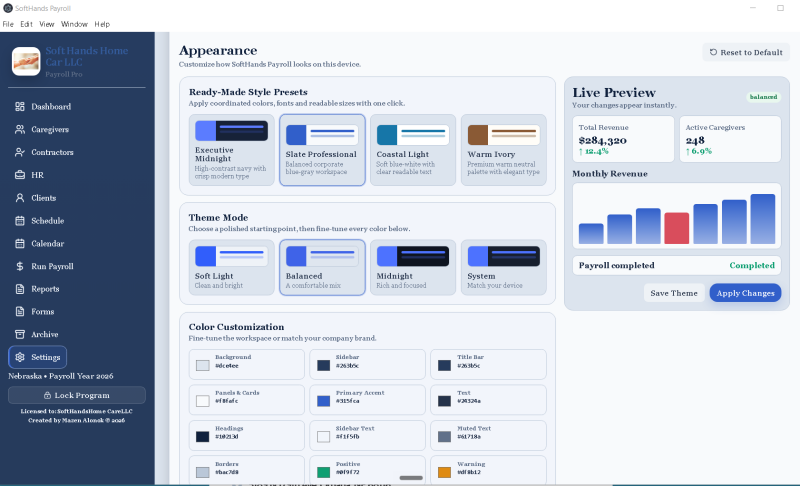
• Custom company name, colors, themes, fonts, and dashboard settings
• Local data storage and database backups
LICENSE INFORMATION
• Includes one permanent license for one Windows computer.
• The license is connected to the computer’s unique Machine ID.
• The license may not be shared, transferred, copied, or resold.
• Internet access is not required for normal software use after activation.
DELIVERY AND ACTIVATION
This is an electronically delivered software license. No physical product will be shipped.
After payment is confirmed:
-
You will receive installation and activation instructions.
-
Install and open SoftHands Payroll.
-
Send us the Machine ID displayed on the activation screen.
-
We will generate a license key specifically for your computer.
-
Enter the license key to activate the full program.
The permanent license key is provided after payment verification and receipt of the correct Machine ID.
IMPORTANT
SoftHands Payroll is a payroll-assistance and recordkeeping application. It does not automatically pay employees, submit payroll taxes, file tax returns, or replace professional accounting, payroll, tax, or legal advice.
Please review the Payment, License & Activation Policy before purchasing.
A Windows computer is required. One license covers one computer only.